Making a rule into something you can assemble
After working with still-life tiles, I wanted a physical construction for Conway’s Life itself. The interesting part is building it: choosing pieces, connecting them, and watching a pattern emerge through the layers.
I opened the forum discussion in March 2019. Paul Callahan and Adam Goucher contributed approaches; Adam’s use of several computational layers helped me find my own construction. I reduced it to 26 tile types, reusing the same eight orange types in two perpendicular passes.
The models below are a current reconstruction of that design. Each coloured set appears in one compact 3D view, with one rotatable example beneath it for inspecting both faces. The 2D drawings show what goes into a tile and what comes out. You can also rotate the complete assembly and adjust the distance between its layers. These are solid-model prototypes; they have not been physically print-tested.
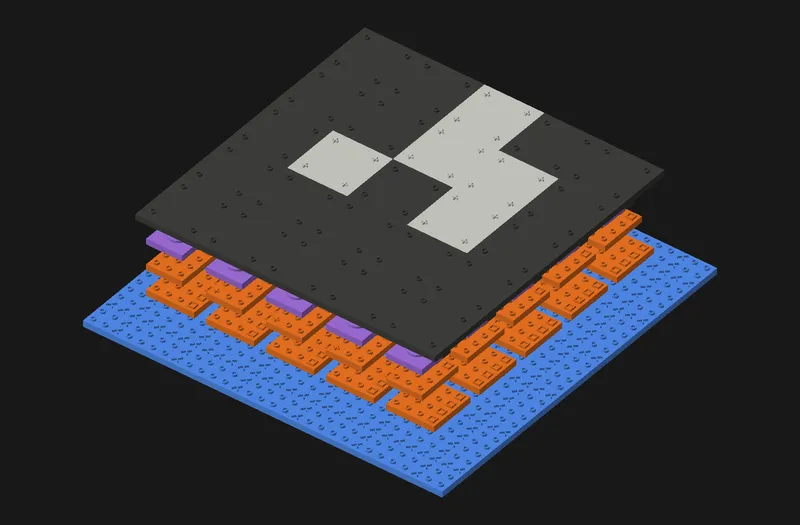
Drag to rotate and turn over; scroll or pinch to zoom. Arrow keys rotate; + and − zoom.
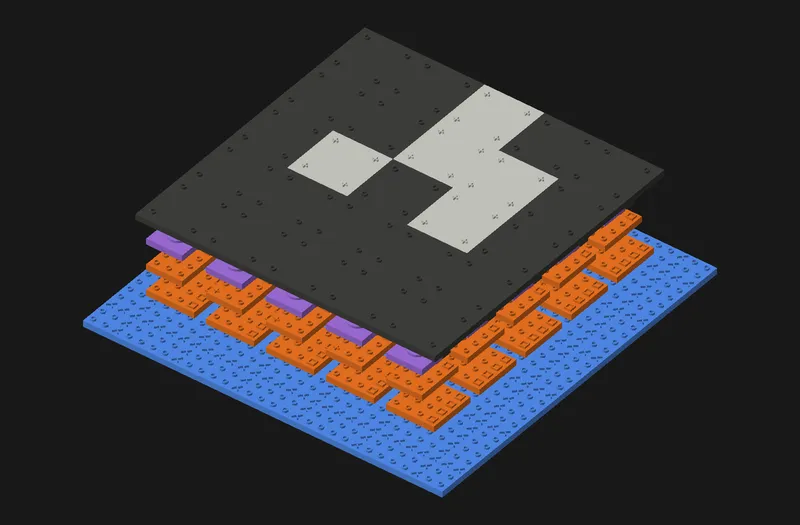
One generation in five layers
Start with black/white tiles representing the current Life cells. Each cell repeats one value at all four corners: circle for dead, plus for live. Then build:
| Layer | Types | What it does |
|---|---|---|
| Blue | 6 | Route neighbouring states into each cell’s work area |
| Orange, horizontal | 8 | Pack each row’s bits and preserve its middle value |
| Orange, vertical | The same 8 | Repeat the operation across columns |
| Purple | 8 | Classify the total as 3, 4, or neither |
| Black/white | 4 | Produce the next cell state |
That is 26 types and five added layers per generation. The initial state makes six physical layers in a one-step example.
The assembly rule is part of the construction: finish the previous layer before starting the next; every input must connect; no bridging over missing pieces. An absent connector is not a zero. A “don’t care” socket accepts either bit, but still needs a supplying connector.
Blue: bring the neighbourhood together
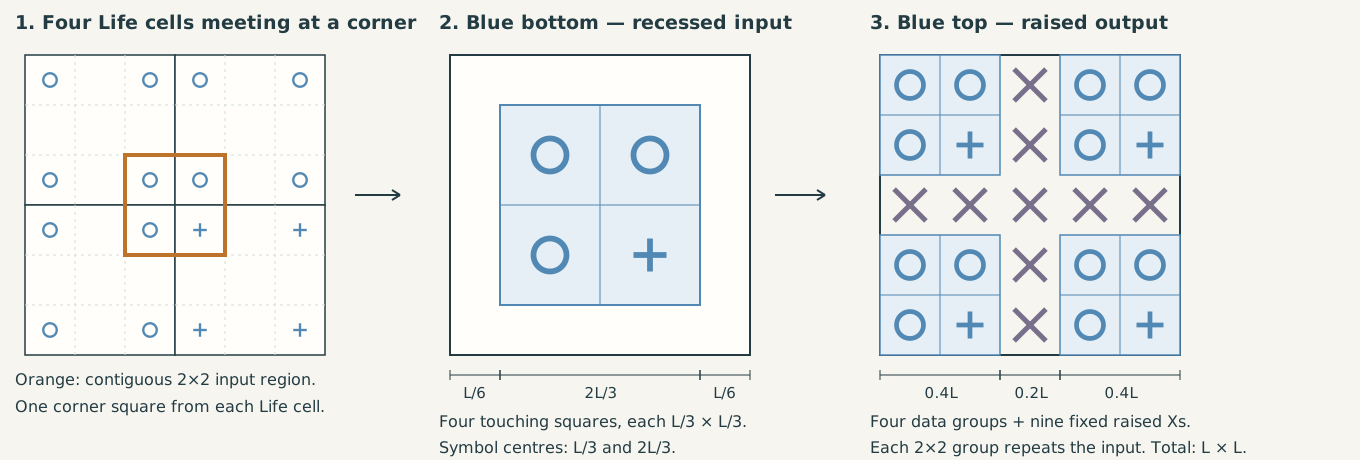
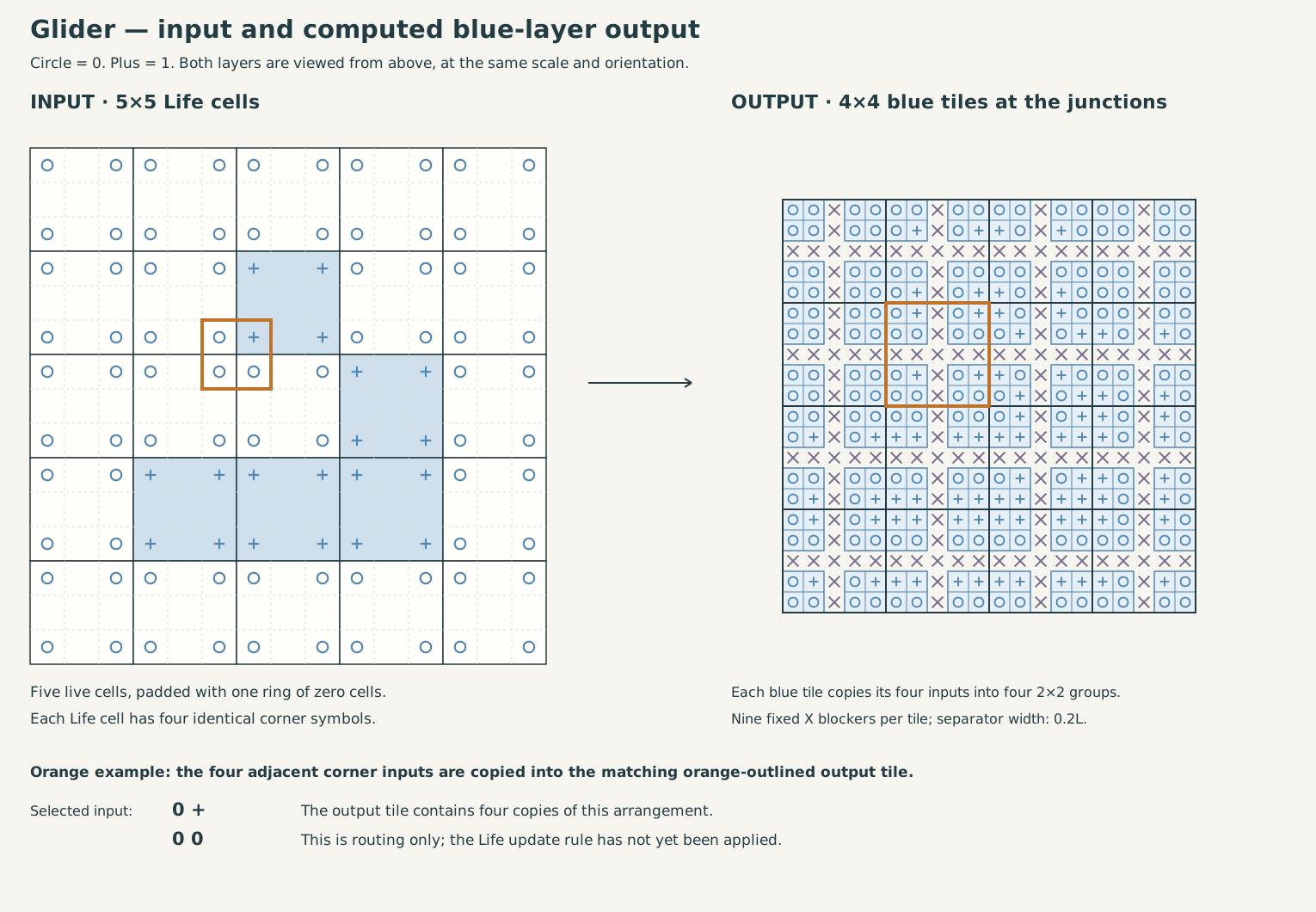
A blue piece sits at the junction of four Life cells. It reads one corner from each cell and repeats that 2×2 arrangement in four groups on its upper face. Six types cover the sixteen binary inputs up to rotation.
The groups are separated by a cross-shaped gap carrying fixed X blockers. These enforce positioning; they are separate from the logical “don’t care” inputs used later. Inputs are recessed; outputs are raised.
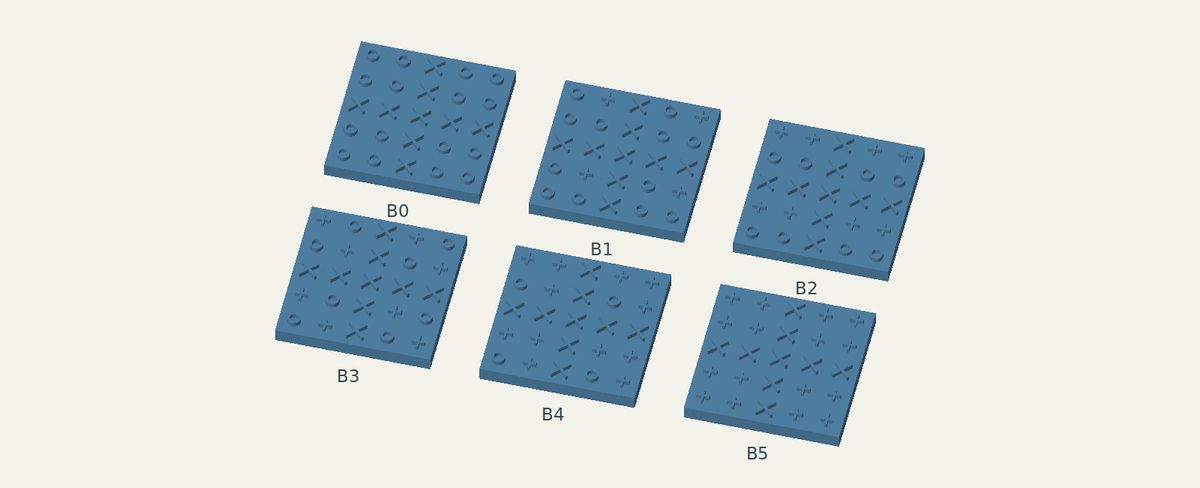
B1 · 0001
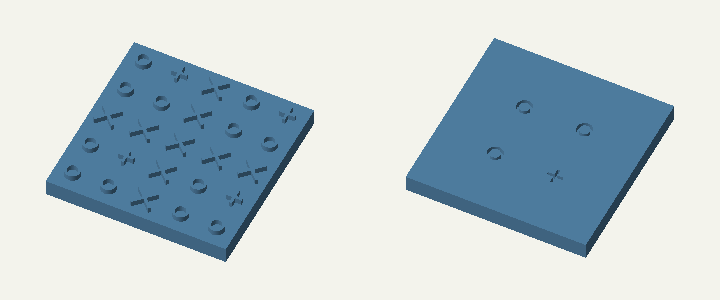
One example, shown from both sides. Drag either view independently; scroll or pinch to zoom. Arrow keys rotate; + and − zoom.
Input → output
Read the drawing from left to right: four complete Life cells, the four adjacent corner values received by a blue tile, then four copies of that 2×2 input. The input region is a contiguous square of side , with an border. The output fills the tile, with the separating cross between its four groups.
All six blue types: exact inputs and outputs
Input: four recessed bit sockets in a 2×2 arrangement, receiving one value from each of four adjacent Life cells. Output: sixteen raised bit keys arranged as four copies of that input. Blue performs routing and duplication; it does not apply Life’s birth or survival rule.
In the table, / separates matrix rows. Both faces use the same board coordinates, looking down through the piece; turning the physical piece over changes how the underside appears. The separating cross is omitted from this logical notation.
| Type | Bottom input, 2×2 | Top output, 4×4 |
|---|---|---|
| B0 | 00 / 00 | 0000 / 0000 / 0000 / 0000 |
| B1 | 00 / 01 | 0000 / 0101 / 0000 / 0101 |
| B2 | 00 / 11 | 0000 / 1111 / 0000 / 1111 |
| B3 | 01 / 10 | 0101 / 1010 / 0101 / 1010 |
| B4 | 01 / 11 | 0101 / 1111 / 0101 / 1111 |
| B5 | 11 / 11 | 1111 / 1111 / 1111 / 1111 |
Rotate the whole piece to match a junction. The six classes are: zero live inputs, one live input, two adjacent, two diagonal, three, and four. Together their rotations cover all sixteen inputs.
Connection to orange: one quadrant from each of four surrounding blue pieces supplies the target cell’s work area. For neighbourhood NW N NE / W s E / SW S SE, the collected face is:
NW  N  N  NE
 W  s  s   E
 W  s  s   E
SW  S  S  SE
This is a view around one target cell, not the output of one blue tile. It makes every row—and the repeated middle rows—suitable for the orange operation.
Follow blue routing across the glider
Orange: pack the bits twice
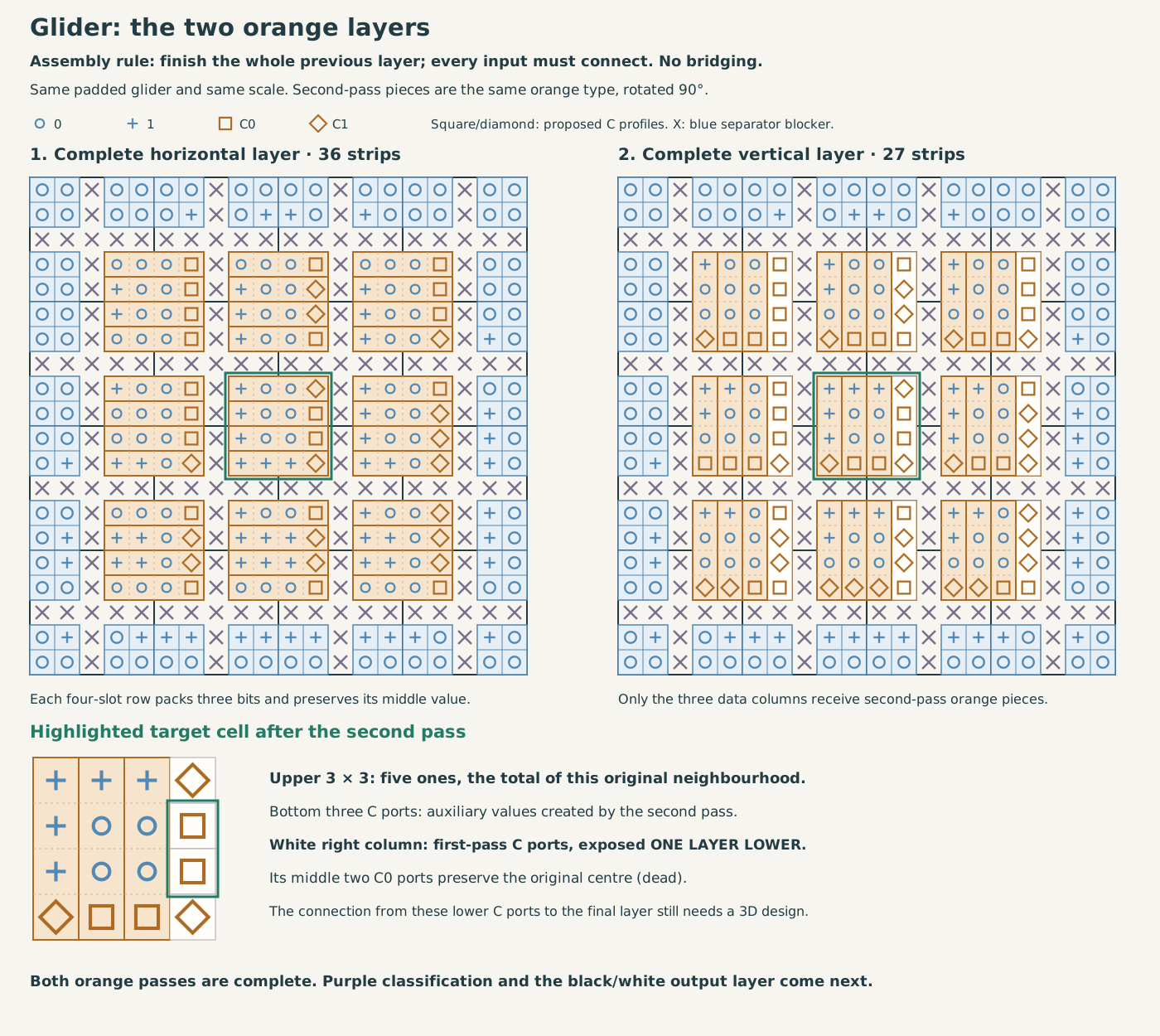
Around each target cell, blue routing presents a 4×4 arrangement. Each row has the form . An orange piece turns it into three packed bits encoding , followed by a separate connector carrying .
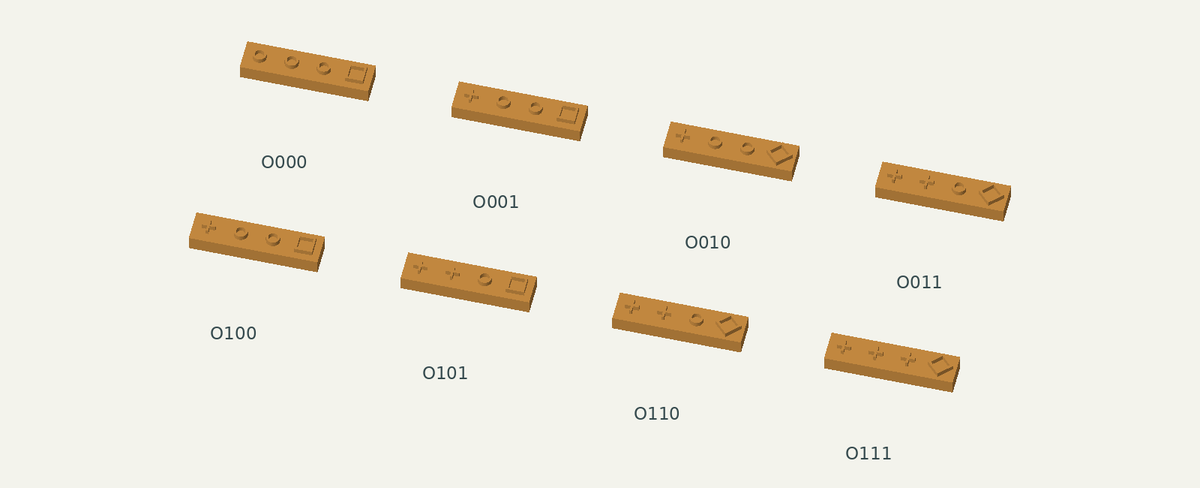
This is unary packing, not binary addition: zero becomes 000, one becomes 100, two becomes 110, and three becomes 111. The duplicate middle value is counted once and preserved separately as C0 or C1. In these models, C0 is a square ring and C1 a diamond ring.
Four horizontal orange pieces make the first pass. Three copies of the same types, rotated 90°, make the second pass over the three data columns. They leave the first pass’s C column exposed. Its middle two connectors preserve the original cell state; the new C connectors along the bottom are auxiliary values.
O010 · 0110
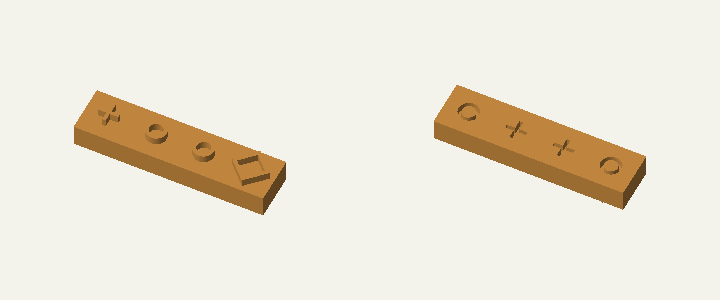
One example, shown from both sides. Drag either view independently; scroll or pinch to zoom. Arrow keys rotate; + and − zoom.
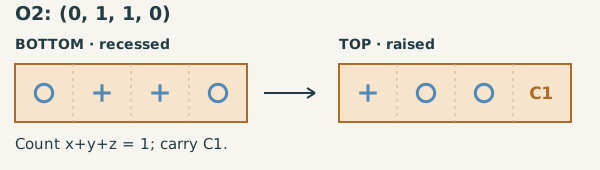
Input → output
For this example, the bottom reads 0, 1, 1, 0. The repeated middle bit counts once, so the top carries 1, 0, 0, followed by C1, preserving that middle bit. Both faces below use the same assembly coordinates; the bottom is not mirror-reversed.
All eight orange types and how the two passes connect
Input: four recessed ordinary-bit sockets in the order (x, y, y, z). Output: three raised ordinary bits, with all the ones packed toward the start of the strip, followed by one raised C_y key. In symbols:
The tile label records the three independent inputs xyz. All four physical inputs must fit, including both copies of y.
| Type | Bottom input | Top output |
|---|---|---|
| O000 | 0, 0, 0, 0 | 0, 0, 0, C0 |
| O001 | 0, 0, 0, 1 | 1, 0, 0, C0 |
| O010 | 0, 1, 1, 0 | 1, 0, 0, C1 |
| O011 | 0, 1, 1, 1 | 1, 1, 0, C1 |
| O100 | 1, 0, 0, 0 | 1, 0, 0, C0 |
| O101 | 1, 0, 0, 1 | 1, 1, 0, C0 |
| O110 | 1, 1, 1, 0 | 1, 1, 0, C1 |
| O111 | 1, 1, 1, 1 | 1, 1, 1, C1 |
First pass: four strips act on the four rows gathered by blue. Their final ports are C_N, C_s, C_s, C_S. The middle two are copies of the original target-cell state. The three data bits in each row encode that row’s count, with its duplicate middle value removed.
Second pass: three strips, turned 90°, act on those three data columns. Each column still has equal middle inputs because the original middle row was duplicated. Removing that duplication leaves nine ordinary output bits whose number of ones is exactly the number of live cells in the original 3×3 neighbourhood, including s.
The first pass’s C column stays exposed. The second pass also makes three C-shaped keys, but these preserve bits of the first pass’s packed middle row; they are auxiliary values, not the original centre state. Purple receives only the nine ordinary bits. Black/white later reads the original C_s from the first pass.
Follow both orange passes across the glider
Purple: recognize the totals that matter
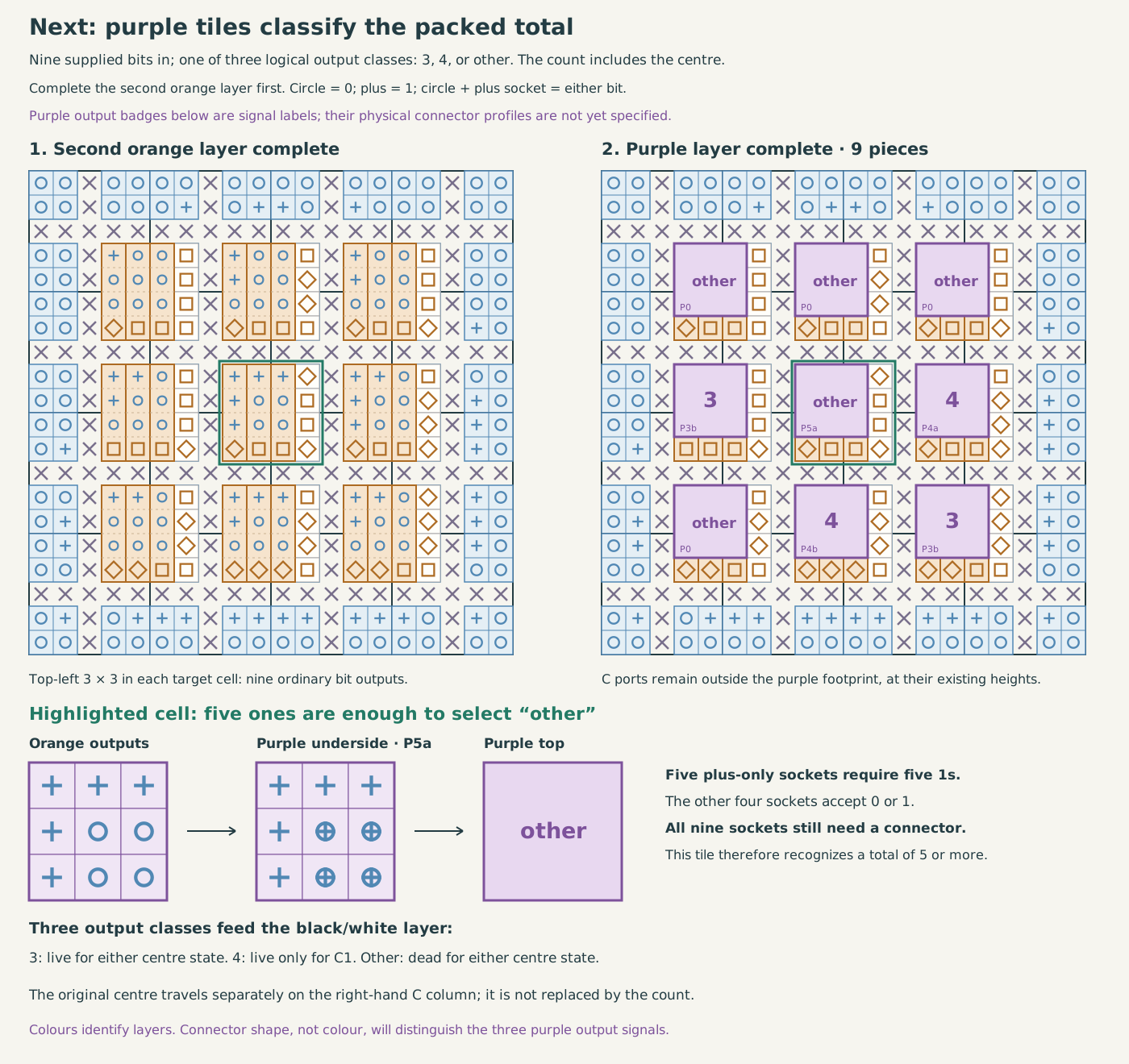
The central 3×3 now contains the packed total, including the centre cell. Purple tiles distinguish three output classes: 3, 4, and other.
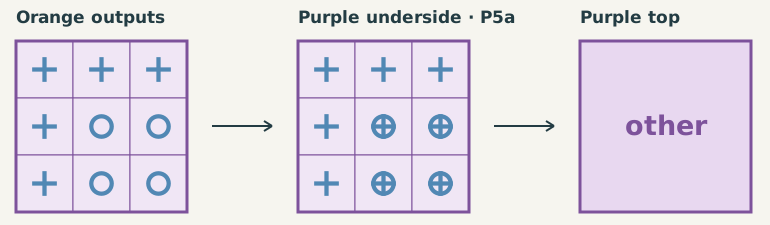
Some inputs need not distinguish zero from one. Their recessed profile combines the circle and plus shapes, so either raised bit can fit. For example, a piece that requires five pluses already knows the count is too high; its remaining four inputs can accept either value.
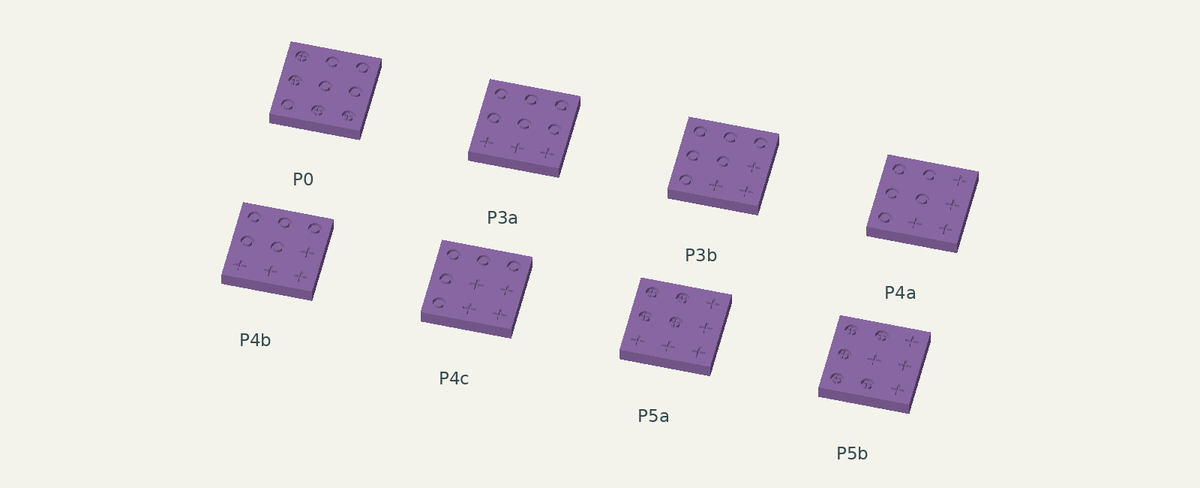
The eight input masks come from the forum’s 26-type reduction. For this prototype, the three output classes use annular keys with different radii. Those physical key profiles are a new modelling choice, not recovered 2019 CAD.
P5a · total 5–9
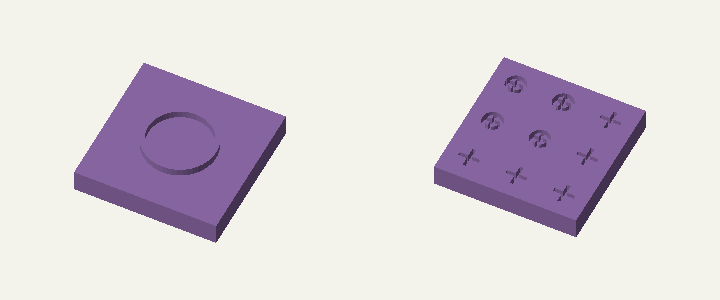
One example, shown from both sides. Drag either view independently; scroll or pinch to zoom. Arrow keys rotate; + and − zoom.
Input → output
Here five required pluses are enough to select other. The four circle-plus sockets accept either supplied bit. All nine inputs must still connect. The output is a count category, not the next Life state.
All eight purple masks and their output signals
Input: nine recessed sockets matching the 3×3 packed orange output. Output: one raised category key: 3, 4, or other. A required 0 accepts only a circle; 1 accepts only a plus; X accepts either supplied bit through a combined circle-plus recess. This logical X is separate from blue’s fixed registration blockers.
Here / separates rows. The masks use the forum’s orientation, with ones packed toward the bottom/right. The orange examples pack toward top/left; rotate a mask by 180° to compare them. Other quarter-turns are allowed when matching a piece.
| Type | Bottom mask, 3×3 | Count covered on packed inputs | Top category |
|---|---|---|---|
| P0 | X00 / X00 / 0XX | 0–2 | other |
| P3a | 000 / 000 / 111 | 3 | 3 |
| P3b | 000 / 001 / 011 | 3 | 3 |
| P4a | 001 / 001 / 011 | 4 | 4 |
| P4b | 000 / 001 / 111 | 4 | 4 |
| P4c | 000 / 011 / 011 | 4 | 4 |
| P5a | XX1 / XX1 / 111 | 5–9 | other |
| P5b | XX1 / X11 / XX1 | 5–9 | other |
These masks are classifiers for the ordered shapes produced by orange, not arbitrary nine-bit patterns. After packing along both axes, ones occupy a corner with a stepped boundary. That restriction lets P0 accept all totals from zero to two, and the two five-or-more masks ignore surplus bits. The two exact-three and three exact-four masks cover their shapes up to rotation. Multiple fits, where possible, give the same category.
Both low totals (0–2) and high totals (5–9) produce the same other key. Purple neither carries nor tests the original centre; that value takes a separate path to the final tile.
Follow purple classification across the glider
Black and white: the next Life state
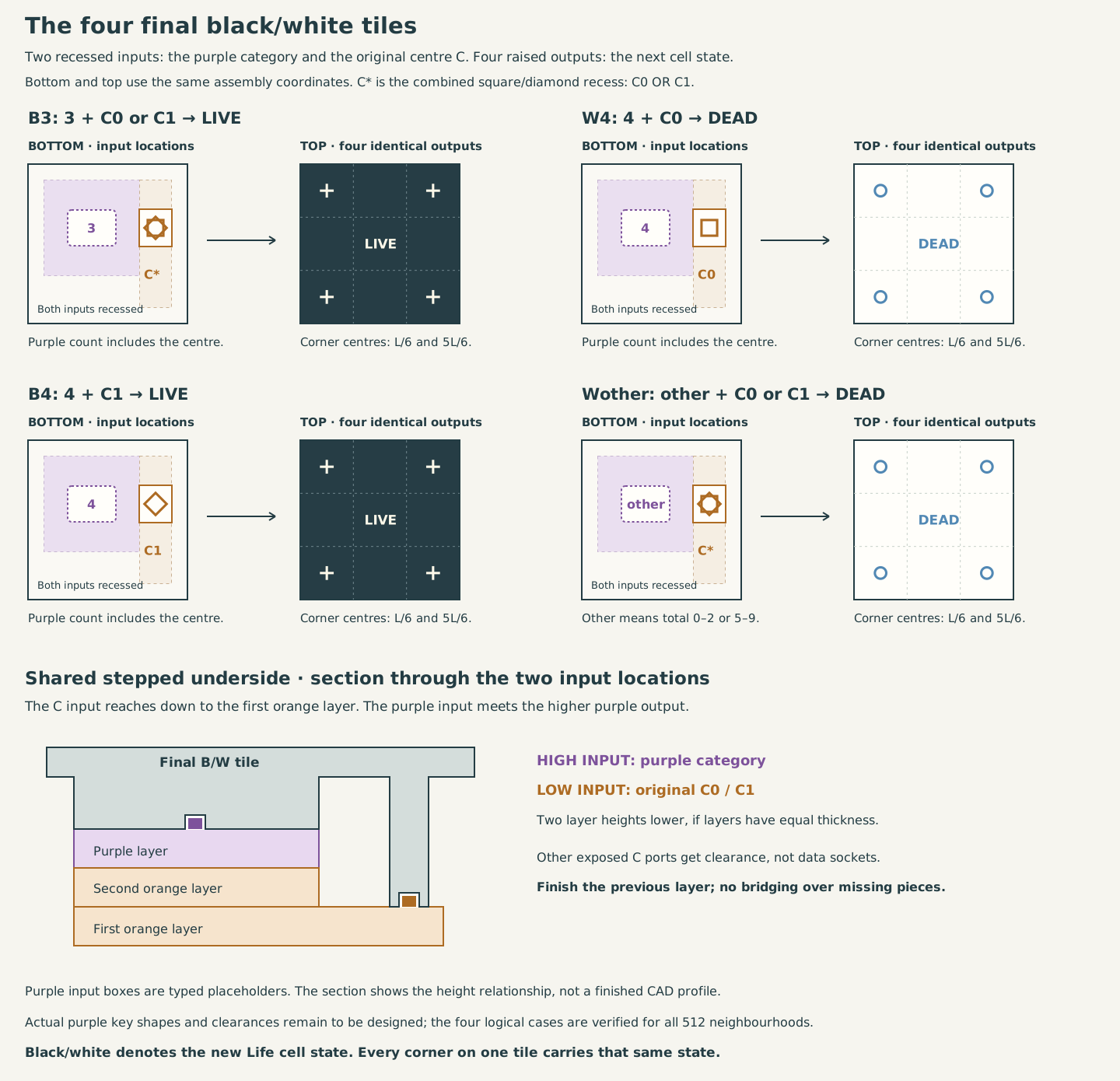
The final tile connects the purple result to the original centre’s C0/C1 connector. Its stepped underside reaches the higher purple output and the lower C column. The other exposed C ports receive clearance rather than additional data sockets.
Let be the number of live neighbours, the original state, and the inclusive total. Then Life’s rule is
| Purple result | Original centre | New state |
|---|---|---|
| 3 | Either | Live |
| 4 | C1 | Live |
| 4 | C0 | Dead |
| Other | Either | Dead |
Each output tile again has four identical corner values. That restores the interface needed to start another generation.
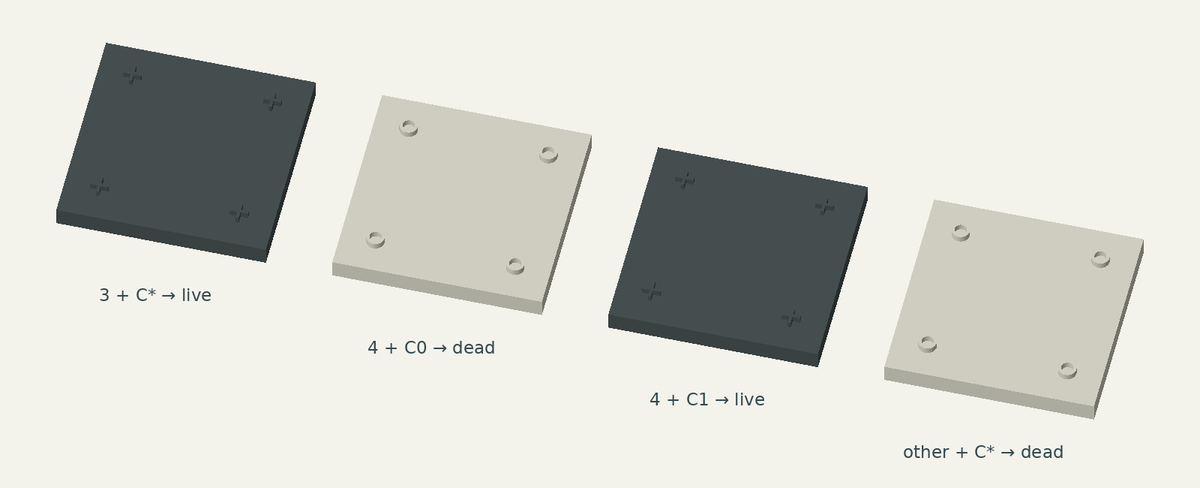
4 + C1 → live
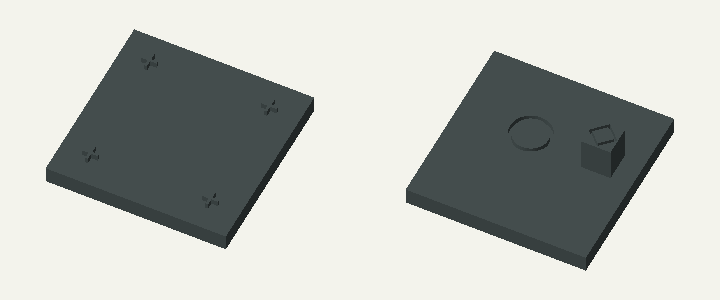
One example, shown from both sides. Drag either view independently; scroll or pinch to zoom. Arrow keys rotate; + and − zoom.
Input → output
A total of 3 makes the next cell live for either original centre value. This tile therefore accepts the purple 3 signal and C0 or C1, and produces four identical pluses.
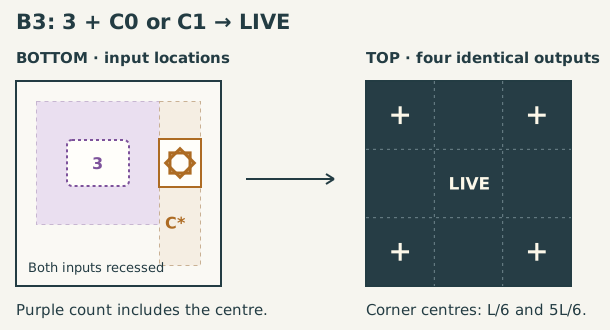
All four final tiles: two inputs, four identical outputs
Input: one category socket receiving purple’s result and one C socket receiving the original centre from the first orange pass. They sit at different heights on the stepped underside. Output: four ordinary corner keys, all equal to the next cell state. C* accepts either supplied C0 or C1; it does not mean the centre connector may be missing.
| Final type | Category input | Centre input | Four corner outputs |
|---|---|---|---|
| 3 + C* → live | 3 | C0 or C1 | 1, 1, 1, 1 |
| 4 + C0 → dead | 4 | C0 | 0, 0, 0, 0 |
| 4 + C1 → live | 4 | C1 | 1, 1, 1, 1 |
| other + C* → dead | other | C0 or C1 | 0, 0, 0, 0 |
For an inclusive total of 3, a dead centre has three neighbours and is born; a live centre has two neighbours and survives. For a total of 4, a live centre has three neighbours and survives, while a dead centre has four and stays dead. All other totals produce a dead cell. The four equal outputs let the next blue layer read the new state from any corner.
See all four final cases and their connection heights
Boundary pieces: keep the same board size
Blue pieces remain centred at cell junctions, including the outer junctions. The blue layer extends half a cell beyond each edge; the orange and purple layers compute only the original cells, and the final black/white layer returns to the original footprint.
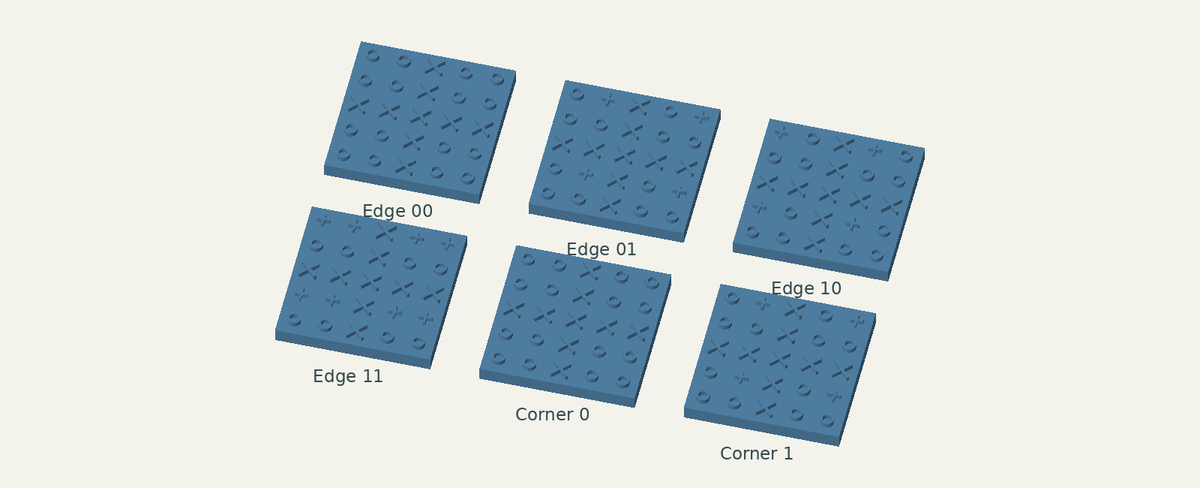
This requires six dedicated boundary types, not ordinary blue tiles moved outward:
- Four full-size edge types have two input recesses over real cells and encode the two exterior neighbours as zero.
- Two full-size corner types have one input recess over a real cell and encode the other three neighbours as zero.
Every boundary tile has the full 4×4 output layout and registration cross. Its underside is solid at the exterior positions: there are no unsupported input sockets to fill. These overhanging variants are placed only on the declared perimeter, facing inward.
For the 60 mm cell pitch used here, the blue footprint is 360×360 mm around the 300×300 mm board. The input and final-state footprints are both 300×300 mm.
All cells on the board still evolve, including the padding. Only the exterior is held at zero. The current glider example goes from 5×5 cells to 5×5 cells, preserving its 300×300 mm input/output footprint and all five live cells after one step.
For a longer run, choose more initial padding. Holding the exterior at zero is a finite-board boundary condition; it is not an unlimited empty plane once activity reaches the edge.
Corner 1 · 1 inside / 3 outside zeros
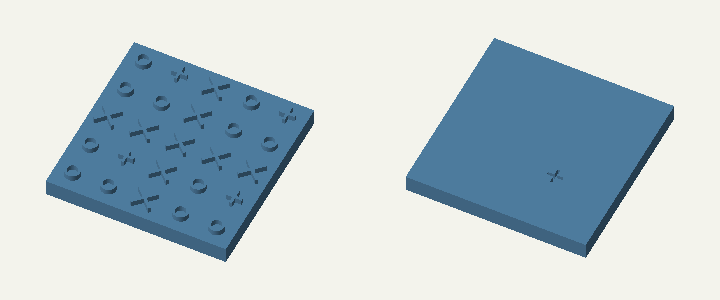
One example, shown from both sides. Drag either view independently; scroll or pinch to zoom. Arrow keys rotate; + and − zoom.
All six boundary types: real inputs and fixed-zero outputs
In this reference orientation an edge piece faces the board below it; a corner piece faces the board below and to its right. Rotate the entire piece for other sides. / separates rows.
| Type | Actual recessed inputs | Completed logical 2×2 | Raised 4×4 output |
|---|---|---|---|
| Edge 00 | Bottom pair 0, 0 | 00 / 00 | 0000 / 0000 / 0000 / 0000 |
| Edge 01 | Bottom pair 0, 1 | 00 / 01 | 0000 / 0101 / 0000 / 0101 |
| Edge 10 | Bottom pair 1, 0 | 00 / 10 | 0000 / 1010 / 0000 / 1010 |
| Edge 11 | Bottom pair 1, 1 | 00 / 11 | 0000 / 1111 / 0000 / 1111 |
| Corner 0 | Bottom-right 0 | 00 / 00 | 0000 / 0000 / 0000 / 0000 |
| Corner 1 | Bottom-right 1 | 00 / 01 | 0000 / 0101 / 0000 / 0101 |
The exterior zeros are built into these pieces’ outputs; there are no input recesses at those exterior locations. Even when an edge and corner piece share the same top pattern, their undersides differ. Their outputs feed orange in the same way as interior blue outputs, so the remaining computation needs no special boundary rule.
Following one glider cell through the computation
Take this 3×3 neighbourhood from the glider. The middle cell is live and has three live neighbours. Life should therefore leave it alive. The diagrams below are logical port layouts in the same board orientation, not drawings of the pieces’ body outlines.
Current state → blue gathering: blue duplicates the middle row and column so four strips can receive their inputs.
Neighbourhood       Blue outputs around the target
0 0 1               0 0 0 1
1 1 1               1 1 1 1
0 0 0               1 1 1 1
                    0 0 0 0
First orange pass: count each row’s three distinct cells, pack that many ones, and keep its middle value in the C column.
1 0 0 | C0
1 1 1 | C1  ← original centre
1 1 1 | C1  ← same original centre
0 0 0 | C0
Second orange pass: apply the same operation down each of the first three columns. The left 3×3 now has four ones, matching the inclusive total of the original neighbourhood.
1 1 1 | C0
1 0 0 | C1  ← original centre retained from pass 1
0 0 0 | C1
------+---
A1 A1 A1  C0
A1 labels the second pass’s auxiliary C1 keys; it is not a new connector shape. The right-hand C column remains at the first-pass height, while the packed square and auxiliary keys are on top of the second pass.
Purple → black/white: the packed square matches P4b after a half-turn. Purple outputs 4; the final tile combines it with the preserved C1, giving a live cell with four raised pluses. It is the original centre value—not an auxiliary C key—that distinguishes survival here from a dead cell with four neighbours.
Every board cell undergoes this calculation using its own overlapping neighbourhood from the same initial state. No cell uses a newly computed neighbour during this generation. The completed black/white layer is the simultaneous next Life state and supplies the inputs for another blue layer.
Models, checks, and fabrication
The downloadable set contains 26 computation types plus six boundary types. The meshes were generated in Python, and the views above are rendered directly from their STL surfaces.
The logical construction was checked against Life for all 512 binary 3×3 neighbourhoods. All 32 type meshes are connected and watertight. Separate boundary-mesh checks verify all 96 output keys, correct socket fits, rejection of the opposite bit, and solid undersides at every exterior input position. The complete 286-piece finite-board example passed 875 solid-intersection checks, within numerical tolerance, and its output agrees with an independent Life step.
These checks cover the specified arrangement and nominal geometry. The models have zero mating clearance; fabrication needs tolerance calibration and physical fitting. They do not establish that every arbitrary placement or rotation is impossible, and 26 is not a proved minimum.
· Model checks · Design notes · Boundary connector checks
The earlier construction-piece work
Later in the 2019 thread I also designed modular pieces for constructing tiles: cores, sides, and input/output faces that form configurable cubes. Those cubes can be joined into compound tiles. They are a different level of the design from the 26 computational types shown here.
The original OpenJSCAD post documents that work. It should not be confused with CAD for the complete Life set.
The related still-life tile project includes the earlier printable designs and reported prints. Multilayer Mutilated Gear explores another way to implement computation through physical mechanisms.