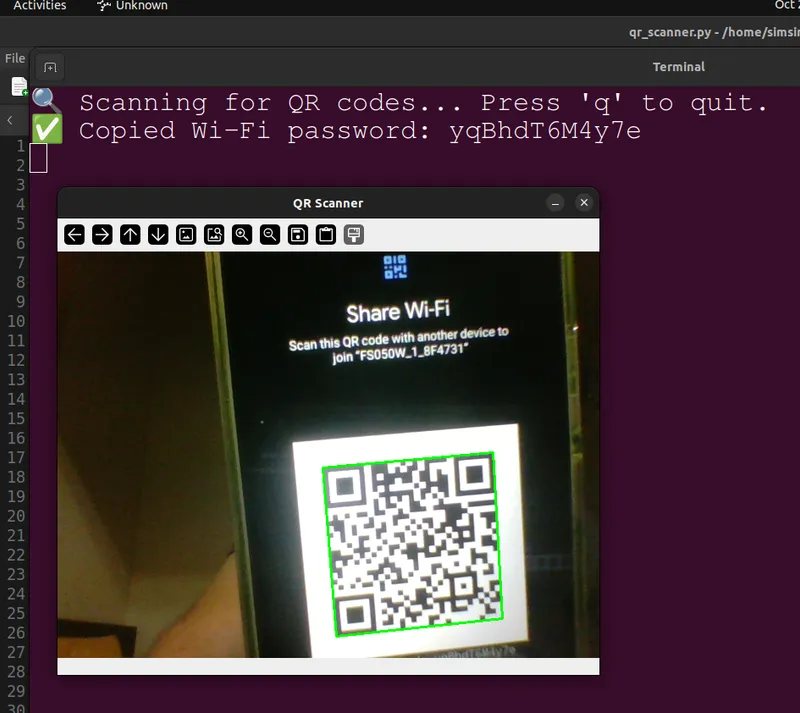
Phones commonly share a Wi-Fi network through a QR code. This desktop utility reads that code with a webcam and copies the password to the clipboard.
A practical workflow
Open the scanner, show the camera a Wi-Fi sharing code, and retrieve the password from the clipboard. The utility does not claim to join the network automatically.
What the code represents
The README gives the standard-style payload example:
WIFI:S:HomeWiFi;T:WPA;P:mySecretPass;;The application extracts the password field, here mySecretPass. The string is illustrative, not an actual credential.
Implementation and usage
The documented Python dependencies are OpenCV, zxing-cpp, and pyperclip: camera input, barcode decoding, and clipboard access. A shell script creates a desktop launcher.
Run the launcher, hold a code in front of the camera, and press q to close the camera window. The README supplies installation steps and screenshots of the scanner workflow.
Scope
This is a focused utility for transferring information you already have through a QR code. It is not a network scanner or a password-recovery system. Use the repository to inspect the parser and the supported payload handling when integrating it into another workflow.